
How to Get Meeting Insights from Google Meet Meetings
Overview
Google Meet is a powerful video conferencing tool integrated directly with Google Workspace. With Efficlose, you can automatically capture every Google Meet session and transform them into comprehensive summaries, action items, and searchable transcripts—ensuring no important detail is ever lost.
Step-by-Step Instructions
Step 1: Connect Google Calendar
Since Google Meet meetings are typically scheduled through Google Calendar, start by connecting your Google account:
- Navigate to Efficlose → Integrations → Google
- Click Connect Google Account
- Select the Google account you use for Google Meet
- Review and approve the permissions requested
- Click Allow to complete the connection
Workspace Accounts
For Google Workspace accounts, your admin may need to approve Efficlose in the Google Admin Console under Security → API Controls → App Access Control.
Step 2: How Efficlose Joins Your Meetings
Automatic Joining
Once connected, Efficlose automatically joins all Zoom meetings where you are the owner:
- The bot detects your scheduled meetings
- Joins at the scheduled start time
- No manual action required
Manual Launch (For Any Meeting)
You can also manually launch the bot for any meeting from the Efficlose UI:
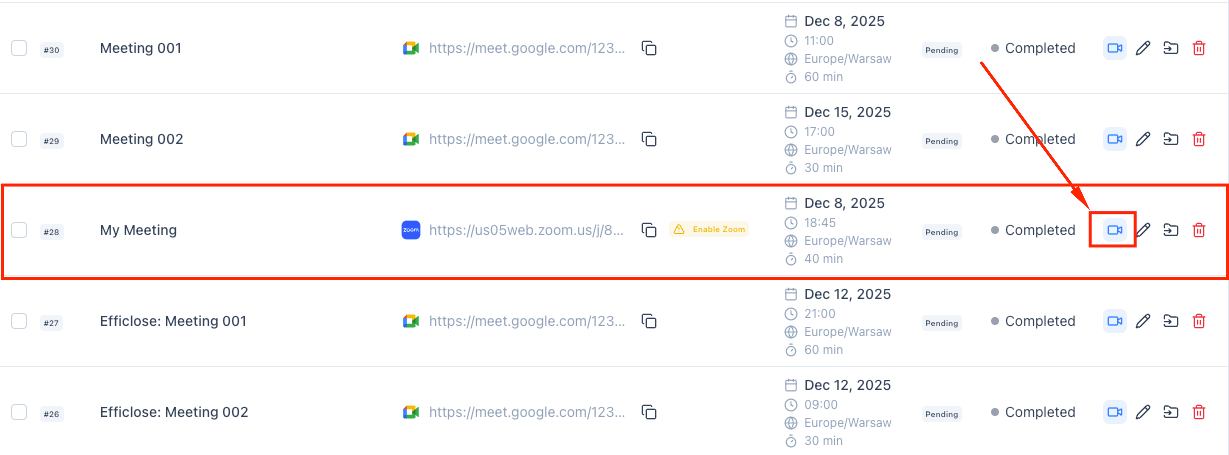
- Go to Efficlose → Meetings and find the meeting in your list
- Click the Join Meeting button (camera icon) next to the meeting
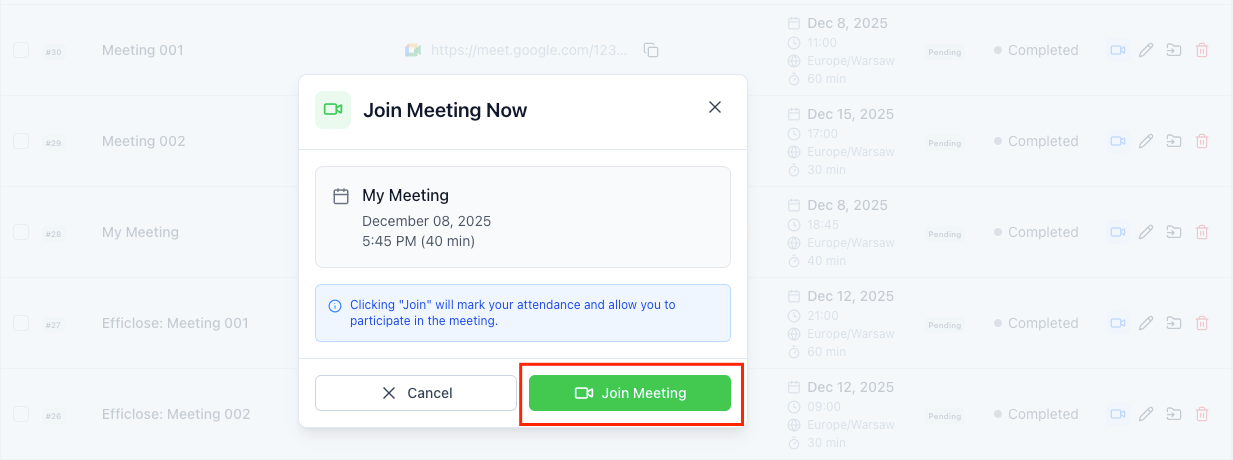
- In the confirmation dialog, review the meeting details and click Join Meeting
- The bot will join using your Zoom account permissions
Step 3: View Meeting Insights
After your Google Meet ends, access comprehensive insights:
- Navigate to Efficlose → Recordings
- Find and click on your Google Meet session
- Review the available insights:
Summary A concise overview of what was discussed, organized by topic. Perfect for:
- Sharing with stakeholders who couldn't attend
- Quick review before follow-up meetings
- Documentation and record-keeping
Key Decisions Automatically identified decisions made during the meeting:
- What was decided
- Who made the decision
- Context around the decision
Transcript Full searchable transcript with:
- Speaker identification
- Timestamps for each segment
- Click-to-play for any section
- Keyword highlighting
Assigned Action Items Tasks extracted from the conversation:
- What needs to be done
- Who is responsible
- Suggested due dates
Best Practices
Optimize Meeting Capture
Use Meeting-Specific Agendas
Include a clear agenda in your Google Calendar event:
- Helps Efficlose structure the summary
- Ensures all topics are covered
- Makes it easier to find specific discussions later
Example agenda format:
1. Project status update (10 min)
2. Budget review (15 min)
3. Q1 planning discussion (20 min)
4. Action items and next steps (5 min)
Encourage Clear, Action-Oriented Language
Train your team to phrase things clearly:
- ✅ "Sarah, please send the proposal to the client by Friday"
- ✅ "We've decided to proceed with vendor A"
- ❌ "Someone should probably look into that sometime"
- ❌ "Let's figure that out later"
During the Meeting
Best Practices for Clear Capture
- Mute when not speaking to reduce background noise
- State your name in larger meetings for better speaker ID
- Summarize decisions before moving to the next topic
- Repeat action items clearly with owner and deadline
After the Meeting
Review and Refine
- Check the generated summary within 24 hours
- Verify action items are accurately captured
- Assign owners and due dates if not auto-detected
- Add any additional context or notes manually
- Share with relevant stakeholders
Troubleshooting
Efficlose Didn't Join My Google Meet
Check Google Permissions
- Go to Efficlose → Integrations → Google
- Verify the connection shows "Active"
- Click Check Permissions to ensure all required access is granted
- If needed, disconnect and reconnect the account
Verify Calendar Event
- Ensure the meeting has a Google Meet link attached
- Check that the event is on a synced calendar
- Verify the meeting time and timezone are correct
Meeting Access Settings
In Google Meet settings, verify:
- "Quick access" is enabled for your organization
- External participants can join if Efficlose is external
- The meeting isn't restricted to specific domains
Confirm Efficlose is Added Correctly
When using manual mode:
- Add
[email protected]to the calendar event, not just the Meet - Ensure the email is spelled correctly
- Check that the invite was sent (look for confirmation)
Transcript Quality Issues
- Encourage use of headsets for better audio
- Minimize background noise and echo
- Ensure stable internet connections
- Avoid talking over each other
Related Guides
Continue building your meeting intelligence workflow:
- Zoom Integration – Set up Zoom meeting capture
- Teams Integration – Configure Microsoft Teams recording
- Working with Meeting Insights – Efficient note processing
Key Takeaways
- Connect your Google account to enable Google Meet capture
- Choose between automatic joining or manual invitation
- Access summaries, transcripts, decisions, and action items after each meeting
- Use clear agendas and action-oriented language for best results
- Verify permissions and calendar sync if the bot doesn't join
Ready to transform your meetings?
Start capturing, transcribing, and analyzing every conversation with AI. Free 14-day trial, no credit card required.
How to Get Meeting Insights from Microsoft Teams Meetings
Automatically capture Teams meeting content and convert it into actionable insights with summaries, transcripts, and action items.
How to Create Action Items from Meeting Notes in Salesforce
Push meeting insights directly into Salesforce to follow up with leads and opportunities, ensuring no customer conversation falls through the cracks.