
How to Get Meeting Insights from Zoom Meetings
Overview
Zoom is one of the most widely used video conferencing platforms for businesses worldwide. With Efficlose, you can automatically capture, analyze, and extract valuable insights from every Zoom meeting without manual note-taking. This guide walks you through the complete setup process and shows you how to get the most out of your Zoom meeting insights.
Step-by-Step Instructions
Step 1: Connect Zoom to Efficlose
Before Efficlose can capture your Zoom meetings, you need to connect your Zoom account:
- Navigate to Efficlose → Integrations
- Click Connect Zoom and you'll be redirected to Zoom's authorization page
- Sign in with your Zoom account credentials
- Review the permissions requested and click Authorize
- Once connected, Efficlose will automatically join all Zoom meetings where you are the owner
Quick Tip: Admin Approval
If you're part of an organization, your Zoom admin may need to approve the Efficlose integration first. Check with your IT team if you encounter authorization issues.
Step 2: View Your Scheduled Meetings
Once connected, your Zoom calendar syncs with Efficlose:
- Navigate to Efficlose → Meetings
- You'll see all your scheduled Zoom meetings automatically imported
- Meetings display with date, time, title, and participants
- The list updates as you schedule new meetings in Zoom
Step 3: How Efficlose Joins Your Meetings
Automatic Joining
Once connected, Efficlose automatically joins all Zoom meetings where you are the owner:
- The bot detects your scheduled meetings
- Joins at the scheduled start time
- No manual action required
Manual Launch (For Your Meetings)
You can also manually launch the bot for your meetings from the Efficlose UI:
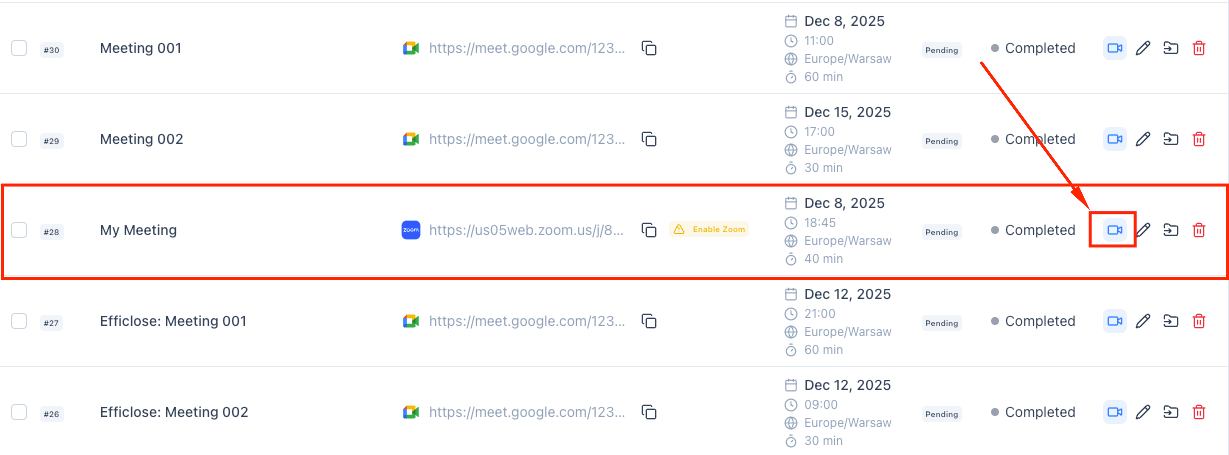
- Go to Efficlose → Meetings and find the meeting in your list
- Click the Join Meeting button (camera icon) next to the meeting
- In the confirmation dialog, review the meeting details and click Join Meeting
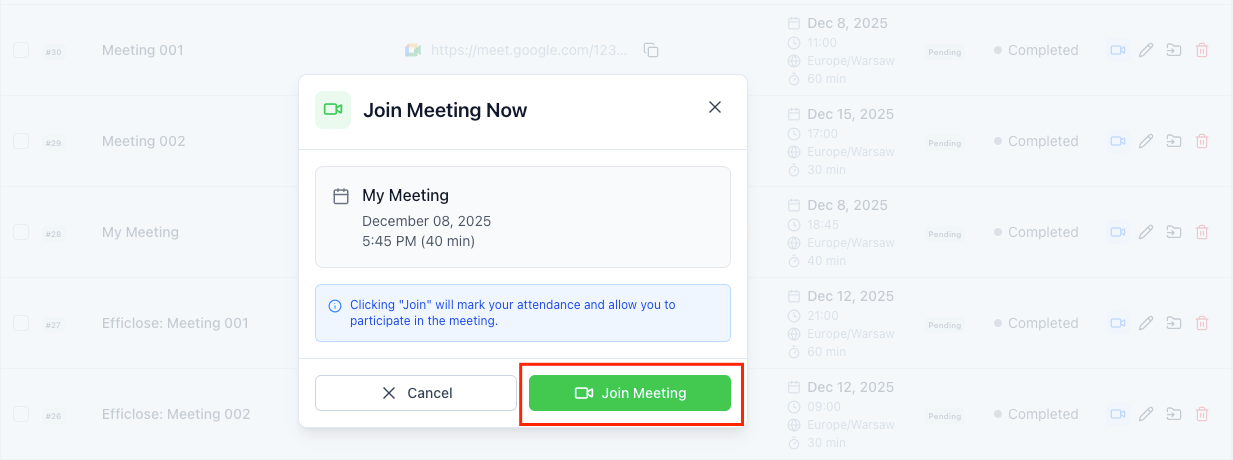
- The bot will join using your Zoom account permissions
Step 4: Access Insights After the Meeting
Once your Zoom meeting ends, Efficlose processes the recording and generates insights:
- Wait for video processing to complete (typically 5-15 minutes depending on meeting length)
- Open Efficlose → Recordings
- Find your Zoom meeting in the list (most recent appear at top)
- Click on the recording to view the full insights dashboard
Available Insights Include:
| Insight Type | Description |
|---|---|
| Key Takeaways | AI-generated summary of the most important points discussed |
| Summary | Comprehensive overview of the entire meeting |
| Action Items | Automatically extracted tasks with suggested assignees |
| Transcript | Full searchable transcript with speaker identification |
Best Practices
Optimize Your Setup
Use Calendar Sync for Accurate Scheduling
Connect your Google Calendar or Outlook calendar to ensure Efficlose knows about all your upcoming Zoom meetings. This enables:
- Automatic bot joining at the right time
- Meeting context from calendar event details
- Better organization in your meeting library
Use Clear and Descriptive Meeting Titles
Instead of generic titles like "Quick Sync" or "Meeting," use descriptive names:
- ✅ "Q4 Sales Pipeline Review with Marketing"
- ✅ "Customer Onboarding - Acme Corp"
- ❌ "Call"
- ❌ "Meeting"
Clear titles help Efficlose categorize meetings and make searching easier later.
During the Meeting
- Speak clearly and avoid talking over others for better transcription
- Mention names when assigning action items ("John will handle the follow-up")
- Summarize decisions verbally to ensure they're captured
- Use the mute button when not speaking to reduce background noise
Troubleshooting
Efficlose Bot Didn't Join My Meeting
Check these common issues:
- Integration Status
- Go to Efficlose → Integrations → Zoom
- Verify the connection shows as "Active"
- If disconnected, click Reconnect and re-authorize
- Email Mismatch
- Confirm the meeting is hosted under the same email connected to Efficlose
- Check that calendar events use the same email account
- Meeting Access Restrictions
- Ensure the meeting isn't locked after starting
- Waiting Room
- If you use Zoom waiting rooms, admit the Efficlose bot when it joins
- Consider disabling waiting room for meetings where Efficlose should join automatically
Poor Transcription Quality
- Verify all participants have good audio quality
- Use headsets instead of laptop speakers when possible
- Minimize background noise and echo
Missing Action Items
- Phrase action items clearly: "Action item: Sarah will send the proposal by Friday"
- Review and manually add any missed items in the post-meeting editor
Removing the Zoom Integration
If you need to disconnect Efficlose from your Zoom account, you can remove the integration at any time. This will stop Efficlose from automatically joining your Zoom meetings.
- Disconnect your Zoom account from Efficlose
- Delete all meetings imported from Zoom
- Remove all associated recordings and insights
Step 1: Navigate to Integrations
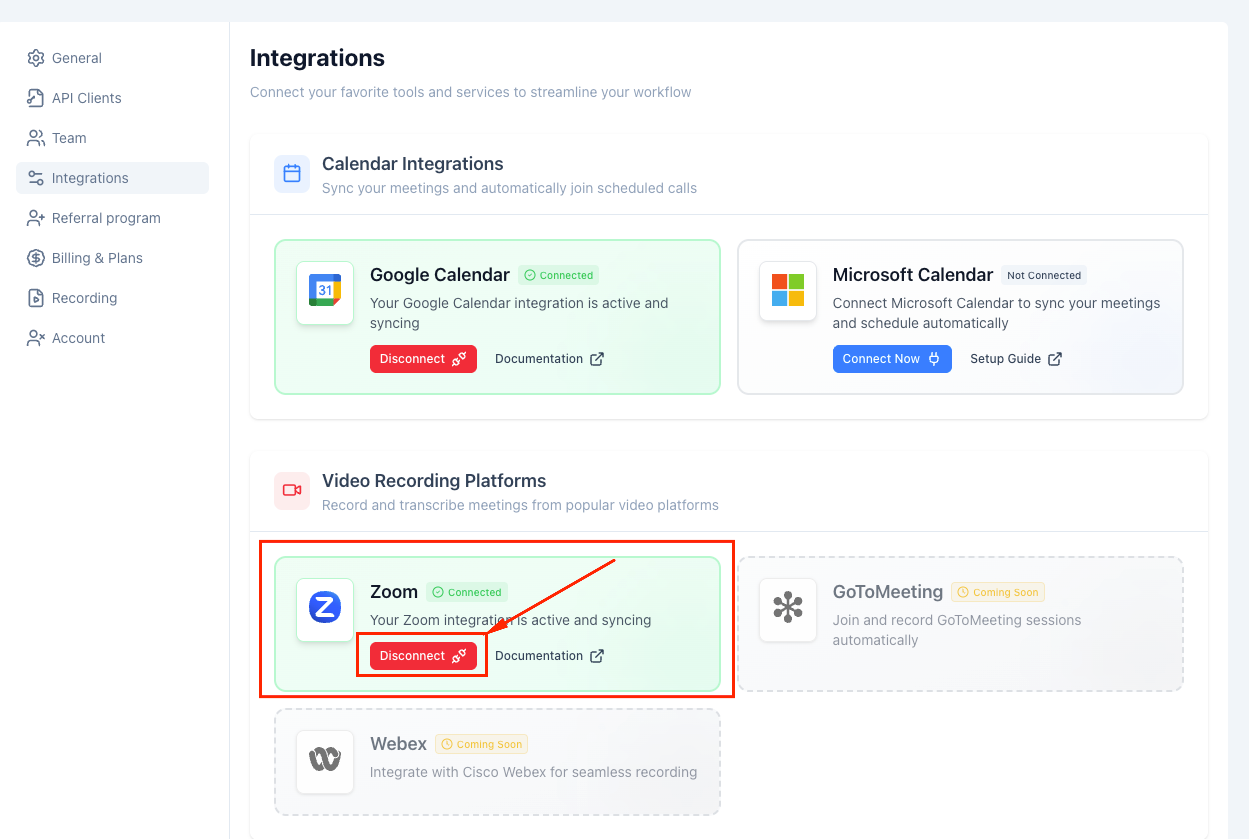
- Go to Efficlose → Integrations
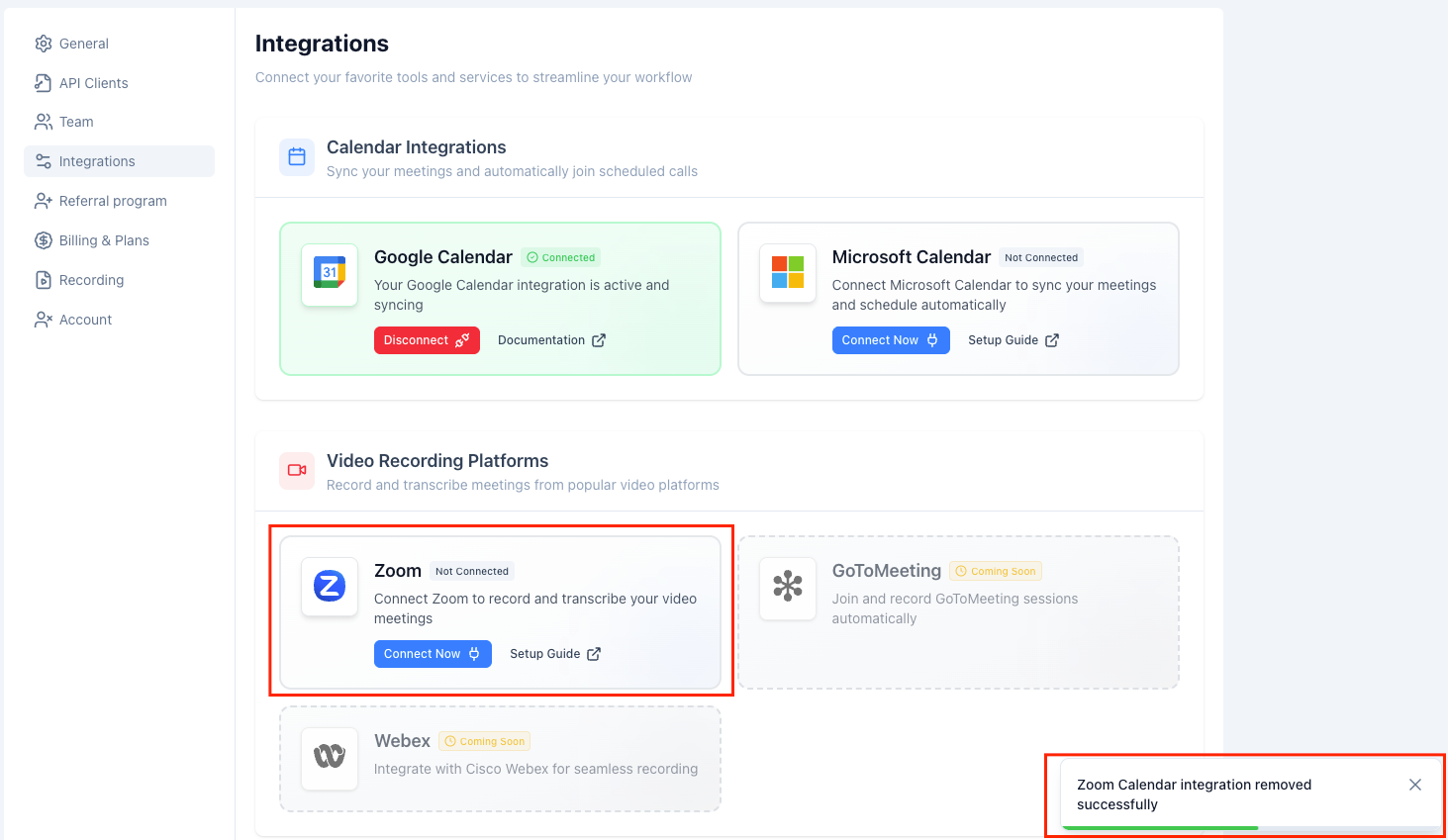
- Find the Zoom integration card under "Video Recording Platforms"
- The card will show a green "Connected" status when the integration is active
- Click the red Disconnect button
Step 2: Confirm the Removal
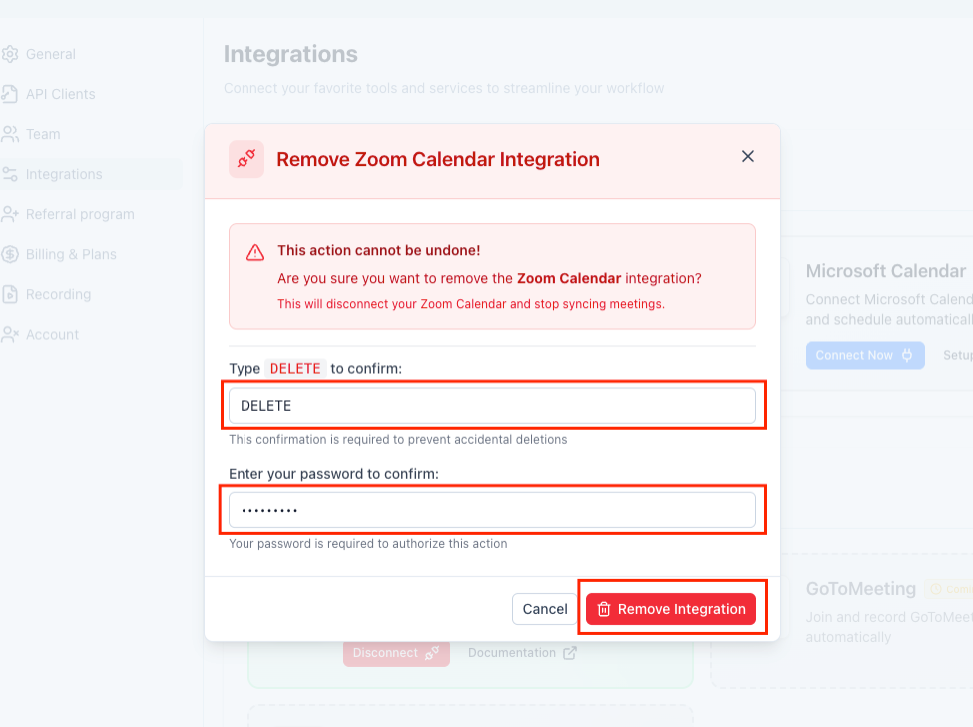
A confirmation dialog will appear to prevent accidental disconnections:
- Type DELETE in the confirmation field (case-sensitive)
- Enter your Efficlose account password for security verification
- Click the Remove Integration button
Step 3: Verify Disconnection
After successful removal:
- A confirmation notification will appear: "Zoom Calendar integration removed successfully"
- The Zoom integration card will now show "Not Connected" status
- The Connect Now button will replace the Disconnect button
Related Guides
Looking to expand your meeting intelligence capabilities? Check out these related guides:
- Microsoft Teams Integration – Set up Teams meeting capture
- Google Meet Integration – Configure Google Meet recording
- Working with Meeting Insights – Maximize value from your insights
Key Takeaways
- Email match is critical: Your Efficlose and Zoom accounts must use the same email address
- Connect Zoom through the Integrations page for automatic meeting capture
- View all your scheduled Zoom meetings synced automatically to Efficlose
- Currently, bots can only join meetings where you are the host/owner
- Access full transcripts, summaries, and action items after each meeting (processing takes 5-30 minutes)
- Use descriptive meeting titles and calendar sync for better organization
- Check integration status and meeting settings if the bot doesn't join
- Removal warning: Disconnecting Zoom deletes all imported meetings and recordings permanently
Ready to transform your meetings?
Start capturing, transcribing, and analyzing every conversation with AI. Free 14-day trial, no credit card required.